
InstaPage® Articles
Article: E-Mail Blast Failure Alerts
InstaPage includes a useful tool for Site Administrators to help identify e-mail delivery failures from your e-mail blasts. If an e-mail from a blast is rejected by the recipient's ISP or mail server, the rejection or failure will be visible shortly after the blast in your Site Administrator Control Panel. Next time you login you will see an alert that when clicked on will show you a list of bounced e-mails from the prior e-mail blast as shown below.
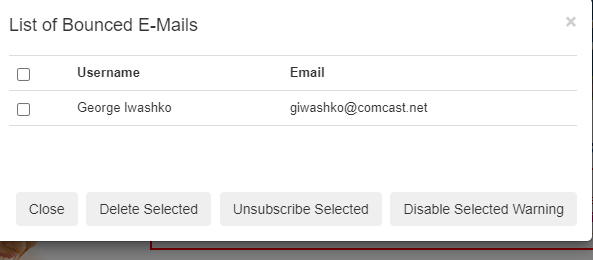
The Site Administrator will be offered three action options:
- Delete Selected - This will completely remove that user from the system immediately and permanently, the choice if the Site Administrator recognizes the user as a former resident no longer requiring access to the website;
- Unsubscribe Selected - This will uncheck the E-Mail Blast Opt-In box on that user's profile, removing them from the e-mail blast list, a good choice if that user continually shows in alerts after multiple e-mail blasts, suggesting that the e-mail address may no longer be valid;
- Disable Selected Warning - This option will simply clear the alert for the selected user and is a good choice if the Site Administrator is unsure if the prior two choices are the best actions.
Should you have questions please e-mail our support department at support@instapage.net.